

Explore Our Comprehensive Training Curriculum on Full Stack Development
Discover the full potential of Full Stack Development, one of the most essential tools in today’s market. Whether you're looking to build cutting-edge applications, enhance your skills, or explore new career opportunities, Full Stack Development offers everything you need. Our training curriculum provides a comprehensive overview, covering all key aspects from the fundamentals to advanced techniques. Learn how to leverage Full Stack Development to create real-world solutions, gain hands-on experience with industry-standard tools, and stay ahead of the curve in an ever-evolving landscape. Join us and take the next step in mastering Full Stack Development!"
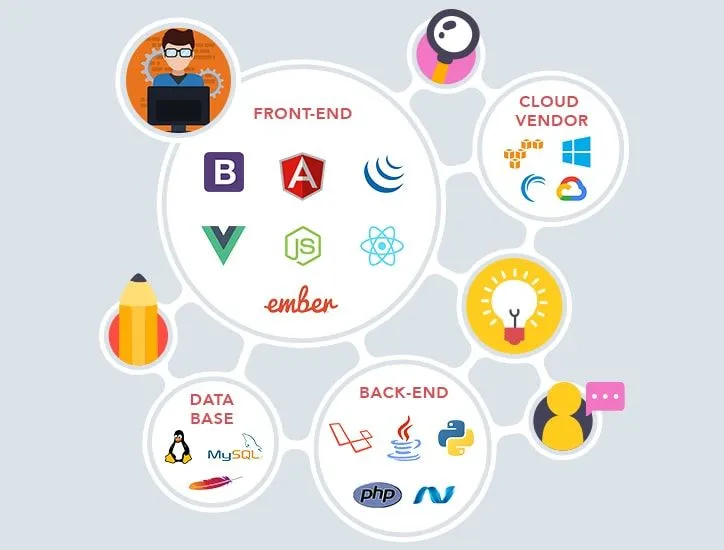
Tools & Technologies You’ll Master in Full Stack Development Course





💳 Course Purchase Info
Everything you need to know before enrolling
- ⏱️ Duration: 120 Hours
- 📚 Modules: 8
- 👥 Students: 40
- 🎯 Level: Beginner
- 🗣️ Language: English
Industry-Aligned Curriculum for This Course
Explore each topic in-depth through interactive sessions, real-world use cases, and tool-based learning. You’ll not only understand the theory but also build practical skills that matter in actual roles.
30+
Case Studies & Projects
Yes
Certificate of Completion
100%
Career Support & Guidance
Key Highlights in Full Stack Development Course
Every Feature Empowers The Career You’ve Always Wanted
80% Practical Training
2 Global Certifications
Integrated Internship
Personalised Career Coach
Instant Doubt Solving
Alumni Network
Multi-Domain Interviews
Profile Building Session
📘 Curriculum Overview
Module 1: Python 20 Hours for this Module
+- Python Basic
Introduction to Python
-
Get Started – Hello World program
-
IDLE for Compiling & Running program
-
Basic Data Types and Assignments
-
Identifiers and Indentation
-
Data Operations
-
Sequence Types: Tuples, Lists
-
Operators and Expressions
-
Dictionary and Sets
-
Control Structure
-
Functions
-
Variable Scope – Global, Local, and Non-Local
-
Logging and Debugging
-
Modules and Packages
-
Python execution environment & tools
- Python Intermediate
Lambda Functions
-
Comprehensions: List, Set, and Dictionary
-
Extending Built-in Types
-
Custom Collection Classes
-
Iterators
-
Decorators
-
Generators
-
Streams
-
Context Manager
-
Functional Tools
- Python Advanced
Files Handling and Globbing
-
Exception Handling
-
Date, Time, and Calendar APIs
-
Command Line Frameworks
-
Regular Expressions and Parsing
-
OOPS Concepts
-
Classes and Objects
-
Instance and Instantiation
-
User Defined Classes
-
Member Variables and Methods
-
Constructors and Destructors
-
Super Class
-
Default Attributes and Methods
-
Inheritance and Override Methods
-
Polymorphism
-
Function and Operator Overloading
-
Abstract Classes
-
Multiple Inheritance
-
Pseudo Private Attributes and Functions
-
__getattribute__Method -
Encapsulation and Intercepting Attribute Access
-
Class and Static Method
-
Properties and Descriptors
-
Coding Style & Guidelines
-
Unit Testing
-
Documentation and Best Practices
-
Distributing Applications
Module 2: Power BI Course 20 Hours for this Module
+Introduction to Power BI
-
Power BI – Architecture
-
Data Sources
-
Comparison with Other BI Tools
-
Data Modeling
-
Power BI – Dashboard
-
Power BI – Visualization
-
Power BI – Excel Integration
-
Sharing Power BI Dashboards
-
DAX Basics in Power BI
-
DAX Functions
-
Power BI – Administration Role
Module 3: Tableau 20 Hours for this Module
+Introduction to Data Visualization
-
Tableau Overview and Installation
-
Connecting to Data Sources
-
Creating Bar Charts, Line Charts, Scatter Plots and Pie Charts
-
Dimensions and Measures
-
Dimensions vs. Measures
-
Sorting Data in Visualizations
-
Sorting and Grouping Data
-
Filters and Quick Filters
-
Introduction to Calculated Fields
-
Creating Basic Calculations
-
Data Blending
-
Basic Data Preparation Techniques
-
Combining Data Sources
-
Introduction to Geographic Mapping
-
Plotting Data on Maps
-
Custom Geocoding
-
Introduction to Dashboards
-
Designing Effective Dashboards
-
Creating Stories in Tableau
-
Storytelling with Data
-
Dual-Axis and Combo Charts
-
Box Plots and Histograms
Module 4: Amazon Web Services 20 Hours for this Module
+Introduction to Cloud Computing
-
Introduction to Amazon Web Services (AWS)
-
Compute Services (EC2, AMI, etc.)
-
EC2 Instances
-
Network & Security
-
Elastic Beanstalk, Amazon Virtual Private Cloud (VPC)
-
Security & Identity Services, IAM
-
Storage & Content Delivery Services, Amazon S3
-
Database Services (RDS)
-
Management Tools (Amazon CloudWatch)
Module 5: MS SQL Server 20 Hours for this Module
+Introduction to MS SQL Server
-
What is SQL Server?
-
Usage of SQL Server
-
SQL Server Components
-
-
MS SQL Server
-
SQL Server editions and features
-
Installation of MS SQL Server
-
-
MS SQL Server - Architecture
-
General Architecture
-
Memory Architecture
-
Data file Architecture
-
Log file Architecture
-
-
MS SQL Server – Management Studio
-
First Method – Using SQL Server Management Studio
-
Second Method – Using T-SQL Script
-
-
MS SQL Server – Database
-
System Databases
-
User Databases
-
-
MS SQL Server – User Database
-
Create, Select and Drop Database
-
Method 1 – Using T-SQL Script or Restore Database
-
Method 2 – Using SQL Server Management Studio
-
-
MS SQL Server – Creating Backups, Restoring Database, Monitor Database, Create Users and Assign Permissions
-
Method 1 – Using T-SQL Script
-
Method 2 – Using SQL Server Management Studio
-
-
MS SQL Server – Services
-
SQL Server
-
SQL Server Agent
-
Other Services
-
-
MS SQL Server – HA Technologies
-
Replication
-
Log Shipping
-
Mirroring
-
Clustering
-
AlwaysON Availability Groups
-
Module 6: Android Course Training 20 Hours for this Module
+What Is Android?
-
Brief Introduction of Android Device Programming
-
Open Handset Alliance and Features
Installing the Android SDK
-
Brief Introduction of Android Device Programming
-
Installing the Android SDK
-
Configuring the Android Plug-in for Eclipse
Android Stack (Architecture)
-
Linux Kernel
-
Native Libraries
-
Dalvik Virtual Machine
-
App Framework
Hello World Application
-
Creating the first Android Application
-
Running the application on Android emulator
-
Hello World App on Android Emulator
-
Main Building Blocks
-
Default Packages
-
Activities
-
Activity Life Cycle
-
Intents
-
Content Providers
-
Broadcast Receiver
Intent Filters in Android
-
Role of filters
-
Intent matching Rules
-
Filters in your Manifest
Working on and Preparing Android User Interface
-
XML Layout Files
-
Views and Layouts
-
Setting Content View
-
Basic UI Components (Buttons, EditText, ListView, AutoCompleteTextView, Spinner)
-
Performing and Handling User Events
Tea Break
Android Apps Building
-
Declaring Variables
-
Using Text View for values to be printed
-
Using Conditions
Designing an Application
-
Implementation of Widgets
-
Using Radio Buttons
-
Use of Different Types of Android Themes
-
Android Layout Understanding & Menu
-
Linear Layout
-
Relative Layout
-
Building PopUp Menu
Android: Toast Creation
-
Creating Standard Toast
-
Setting the Position of a Toast on the Screen
Tea Break
Sensors in Android
-
How Sensors Work
-
Types of Sensors
-
Listening to Sensor Reading
-
Working with Acceleration Sensor
-
Reading X, Y, Z Coordinates
Work With Your Android Phone
-
Get your Apps on Phone
-
Get Connected with Phones
-
App Transfer Among Handsets
-
Broadcast Receiver
-
Life Cycle of Broadcast Receiver
-
Some System Broadcast
-
Pending Intent
-
🎓 What You Will Learn
Practical Knowledge
Learn concepts through real-life examples and hands-on activities designed to strengthen your understanding.
Critical Thinking
Develop the ability to analyze problems, evaluate solutions, and make informed decisions with confidence.
Communication Skills
Improve your written and verbal communication to express ideas clearly and effectively.
Problem Solving
Build logical reasoning and creativity to tackle challenges effectively and independently.
🚀 Upcoming Batches
Hurry up! Limited seats available for our most in-demand courses.
 🔥 Filling Fast
Become Career Ready With Us
- Enroll once & get access to all courses.
- Small batch sizes (only 20 seats).
- Internships + 2 Global Certifications.
- Practice on platforms like LeetCode & HackerRank.
- 6-Month On-Job Support & Corporate Visits.
Turn Your Learning Into a Career That You’re Proud Of
01
Follow 3A
Attendance, Assignment & Assessment — your path to structured learning success.
02
Industry Skills
Hands-on practice with tools that match real industry demand.
03
Profile Building
Build a winning resume, LinkedIn profile & web portfolio.
04
Exam
Prove your expertise with our industry-standard evaluation exam.
05
Global Certification
Earn globally recognized certifications to showcase your skills.
06
Internship
Apply what you’ve learned in real-world projects & gain experience.
Instructors
Mentors Behind Your Career Growth

Mr. Sujeet Yadav
Fullstack Teacher
St.Vincent Palloti College of Engineering & Technology, Nagpur.

Mr. Manoj Chowrasiya
Fullstack Teacher
University Department Of Computer Science, University Of Mumbai Kalina Campus.

Mr. Vivek Pal
Fullstack Teacher
University Department Of Computer Science, University Of Mumbai.

Mr. Shibin Alva
Fullstack Teacher
Thakur College of Engineering & Technology,Kandivli.

Mr. Aakash Vishwakarma
Fullstack teacher
Thakur College of Engineering & Technology, Mumbai.

Mr. Uttam Vishwakarma
Fullstack Teacher
Thadomal Shahani College of Engineering, Bandra.
What Our Students Say

Anjali
(College Student)
“TechUpgrad makes learning very simple. I am not from a technical background, so I was worried at first. But the teachers explain slowly and repeat if we don’t understand. They also give practical tasks after every session. This has helped me gain confidence and stop feeling scared of technology.”

Ravi
(Student)
“I never understood coding before. After joining TechUpgrad, I can finally make small programs. The teachers explain very clearly.”

Meera
(Professional)
“Since I already have a full-time job, I wanted something flexible. TechUpgrad was perfect for me because the classes are well-organized, and I could adjust timings when required. The mentors always guided me patiently, even when I struggled. I learned new skills without stress, and it is already helping me at work.”

Parents
(Parents Feedback)
“My daughter is only 11, but TechUpgrad made learning fun for her. The classes are interactive, and the trainers are very friendly with kids. She recently created her first small game, and the smile on her face said it all. I am glad she is learning technology in such a positive way.”

Rahul
(Begginer)
“Earlier I thought coding was very hard. But now I can make small apps. It feels really good to learn with TechUpgrad.”

Meera
(Proffesional)
“I have a job, so I needed flexible timing. TechUpgrad helped me learn without stress. The support is always there.”

Ravi
(Student)
“Before joining TechUpgrad, coding looked very difficult to me. I used to watch online videos but never understood properly. Here, the teachers explain step by step and clear every doubt. Slowly, I started writing my own code. Now I feel proud that I can make small programs on my own.”

Parents
(Parents Feedback)
“My daughter enjoys her TechUpgrad classes. She is just 11 and already made her first small game. I am very happy.”

Rahul
(Begginer)
“Earlier I thought coding was only for very smart people. But after joining TechUpgrad, I realized anyone can learn with the right guidance. The trainers start from basics and give us small projects to practice. After some weeks, I was able to make my own simple app. It gave me a lot of confidence.”

Anjali
(College Student)
“Classes are simple and easy to follow. I don’t feel lost anymore. TechUpgrad makes learning step by step.”
Our Hiring Partners
Trusted by top companies who believe in the talent we nurture.













🚀 Campus Placement Drives
No placement drives available at the moment.
🌐 Explore TechUpgrad Branches
Maharashtra
Ambernath Branch
Ambernath (Mumbai Metropolitan Region)
Address : Near Ambernath East Railway Station,
Ambernath (E), Mumbai, Maharashtra – 421501